
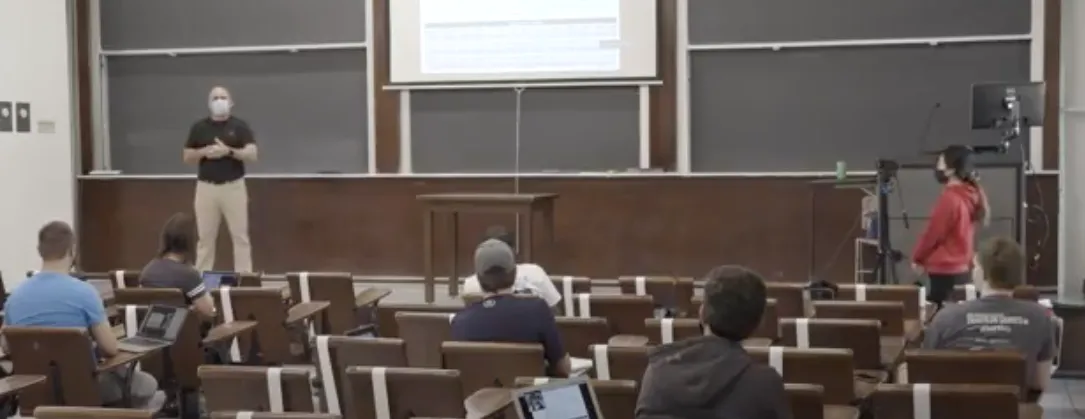
Hyflex Teaching at SPS
Columbia University's School of Professional Studies (SPS) aims to support faculty’s safe return to campus and their preparation to teach in the HyFlex modality. The resources on this page are designed to support HyFlex teaching and learning, including best practices and shared faculty experience.
HyFlex combines the terms “hybrid” and “flexible.” Hybrid learning refers to learning that integrates synchronous and asynchronous experiences in service of intended learning objectives. All students in a hybrid course are expected to undergo the same combination of online and in-person activities. In contrast, the “flexible” aspect of HyFlex is that students are given choice in how they participate in the course and engage with material in the mode that works best for them over the course and from session to session. They can:
- Participate in face-to-face synchronous class sessions in-person (in a classroom)
- Participate in face-to-face class sessions via video conference (e.g., Zoom)
- Participate fully asynchronously via CourseWorks.
Faculty Training and Development
The School of Professional Studies has resources and support available to help you prepare for and administer your HyFlex course.
- Sign-up for one of the following dedicated HyFlex training and development sessions:
- Participate in pedagogical workshops or sign-up for Canvas or Zoom training or practice sessions here.
- We highly recommend that all faculty familiarize themselves with the work that video assistants will be providing to support the delivery of instruction, described in this video.
- Get help with course logistics and technical support via the CUSPS Helpdesk.
- Get help building class session plans, brainstorm class activities, or get advice on how to implement your class. Sign up for a pedagogical consultation with a member of the Faculty Assessment and Development or Online Curriculum and Instruction teams.
In addition, HyFlex instructors must comply with Columbia University's COVID-19 Campus Access Requirements, listed below. Please make sure to familiarize yourself with these.
- To experience an example of how the flow of teaching works in a sample class, please see the Sample HyFlex Class video.
- You can find a sample class session here. It has been adapted from Beatty, B. J. (2019). Values and Principles of Hybrid-Flexible Course Design. In B. J. Beatty (Ed.), Hybrid-Flexible Course Design. EdTech Books.
- For additional class session designs of varying lengths, click here.
This section provides a series of steps to take to make sure your course is ready for the HyFlex modality:
1. Consider how norms will change
Review each of the following for your class and consider incorporating specific instructions in your syllabi as appropriate. Review Columbia’s Enhanced Health and Safety Policy and SPS Communication regarding reopening. Be sure to consult with your Academic Director for additional program-specific guidelines:
- Course modality
- Class meeting schedule
- Participation expectations as related to modality
- Attendance expectations as related to modality
- Personal Protection Equipment (PPE) expectations
- Maintaining Community Safety Best Practices
- Netiquette i.e. norms for respectful online communication and engagement
2. Create opportunities for connection and community building
In a face-to-face class, students have opportunities to spend time with each other and with the instructor informally, which can create a sense of community. There are many ways in which you can foster a sense of community for all students:
- Rather than exclusively presenting information through in-class lectures, create short videos or readings for students to complete before the class session. During class you can give a brief summary or review and use the rest of the time to address questions and have discussions about the material.
- Use your Associate to monitor the chat so that you can take questions from online students during class time.
- Use Discussion forums to support conversation between students in different modalities.
- Create a water-cooler discussion forum to support informal conversations between students.
You can find a sample class session in the section below. It demonstrates a few examples of activities to promote student engagement and participation, with instructions on how to adapt them for the three different modalities. Note that the session includes some presentation of content but provides multiple opportunities for students to engage with the material.
3. Make adjustments to student activities or assignments
At SPS, instructors teaching Hyflex courses will need to account for three modalities for student activities: 1) Face-to-face; 2) Live-streamed, synchronous; 3) Asynchronous only.
When creating student activities or assignments for HyFlex, there are a few important considerations to keep in mind:
- Activities in HyFlex will take longer than they do in-person. To accommodate for this extra time, you may wish to reduce the amount of class time spent giving lectures. Use tools like Panopto or Screencast-o-matic to record mini-lectures that students can watch in preparation for the class session.
- When introducing and explaining an activity to your students, be sure to give clear and explicit instructions for how to complete the activity in all three modalities. Make sure all students have access to any resources or documents they need in order to complete the activity, and clearly explain the deliverables for the activity.
Many of the activities or assignments you use in a traditional in-person class can be modified for the HyFlex modality. There are many options for modifying activities that you may wish to consider, including:
- Use Google Docs, Zoom chat, Discussion Boards in Canvas, and other tools to help students collaborate during synchronous sessions.
- When asking students to work in groups, be intentional about how you form groups. Group face-to-face students with each other and group online students with each other to enable ease of communication (and decrease mic interference in the classroom). Consider grouping students by time zone where feasible.
- Rather than having students submit assignments so only you can see them, ask them to post their work on Discussion Boards and ask students comment on each others’ work
- Use online polling extensively (via Canvas, Zoom Polls or Poll Everywhere) to provide engagement activities for all students. This is an excellent resource on how to promote deep learning using multiple choice questions.
This document contains more information and ideas about how different activities can be adapted for each modality.
4. Adjust assessments to fit the new modality
Whenever possible, try to replace high-stakes assessments (e.g., midterms, final exams, final projects) with assessments that are lower stakes (e.g., regular quizzes or projects completed in stages throughout the semester). This helps reduce test anxiety and encourages academic integrity, and also allows you and your students to track progress and to course-correct during the semester as needed.
When revising assessments, keep in mind that the assessment should be equitable for students regardless of modality. For example, you may wish to have a closed-book exam, but administering a closed-book exam for students taking the class asynchronously may not be possible. Instead, consider making your assessments open-book for everyone.
5. Consider equity across modalities
As you are developing your course for HyFlex, be sure to consider whether your course is equitable for students in all modalities. Do all students have opportunities to:
- Ask questions about the course material
- Receive feedback from the instructor(s)
- Participate in activities and discussions
- Engage with other students in the class
- Demonstrate their learning on the course objectives
- Access course material
- Attend office hours
6. Get help or training
The School of Professional Studies has a number of resources and support available to help you prepare for and administer your course.
Participate in pedagogical workshops or sign-up for Canvas or Zoom training or practice sessions here.
Get help with course logistics and technical support via the CUSPS Helpdesk.
Get help building class session plans, brainstorm class activities, or get advice on how to implement your class. Sign up for a pedagogical consultation with a member of the Faculty Assessment and Development or Online Curriculum and Instruction teams.
Beatty, B. J. (2020). Can HyFlex options support students in the midst of uncertainty? Educause Review. March 26, 2020.
Beatty, B. J. (Ed.) (2019). Hybrid-Flexible Course Design. EdTech Books.
Bruff, D. (2020). Active learning in hybrid and physically distanced classrooms. Vanderbilt University Center for Teaching. June 11, 2020.
Bruff, D. (2009). Multiple-choice questions you wouldn’t put on a test: Promoting deep learning using clickers. Essays on teaching excellence. 21(3), 2009-10.
Clemson University (Fall 2020). Academic Model Options for Blended Learning.
Clark, N. (2020). The physically distanced classroom: A day in the life. Inside Higher Education, May 27, 2020.
Lederman, D. (2020). The HyFlex option for instruction if campuses open this Fall. May 13, 2020.
Louisiana State University (2020). Active learning while physical distancing.
Macharaschwili, C.E. (2020). Wondering how to accommodate remote learners into your face-to-face classroom this fall? Try the “Buddy Protocol”. June 23, 2020.
Northwestern University (2020). How to utilize informal learning spaces. Learning from digital water cooler conversations.
The following resources have been created by SPS staff to support instructors teaching online with information regarding best practices.
How The HyFlex Classroom Works
Learn about the various kinds of classroom setups that support HyFlex teaching, including several teaching styles.
HyFlex setups vary widely. Classes can run in rooms outfitted with video conferencing installations, but can also run in more typical classrooms using podium projectors and student laptops or tablets.
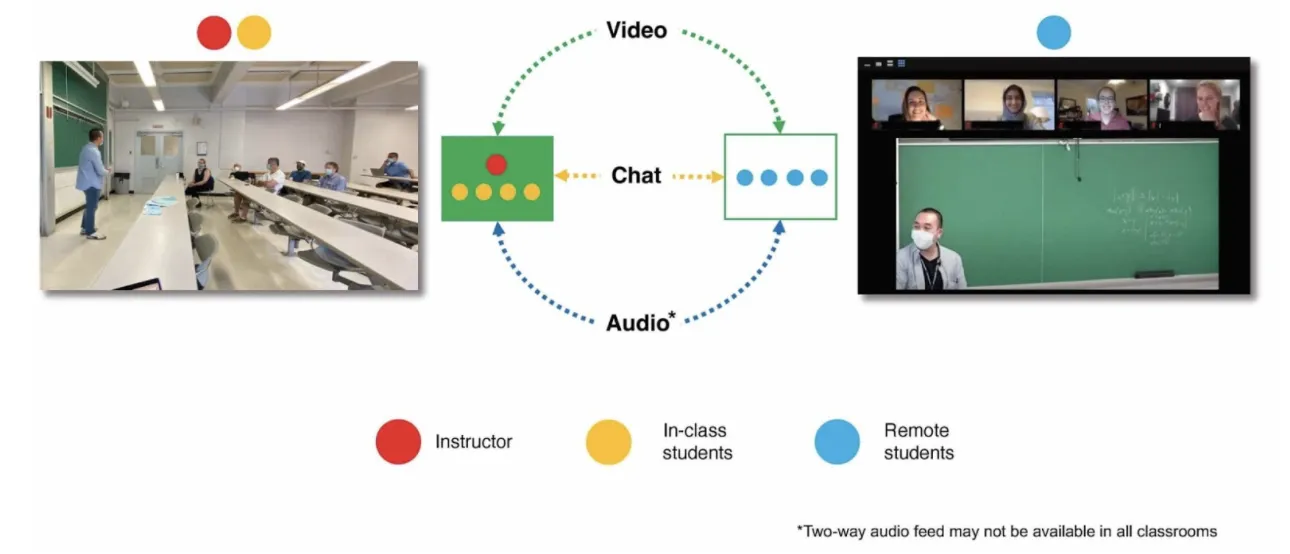
Video conference software such as Zoom generally connects in-person and remote students to the synchronous class, as illustrated in Figure 1. In the background of this setup, the course management system (at Columbia, CourseWorks) hosts materials and interactions for the whole class.
A typical HyFlex setup for lecture classes, in which information flows primarily from the instructor to students, entails two cameras and distributed microphones, as illustrated in Figures 2 and 3. Figure 2 shows a lecture-oriented HyFlex setup, centering on an instructor presenting to students.
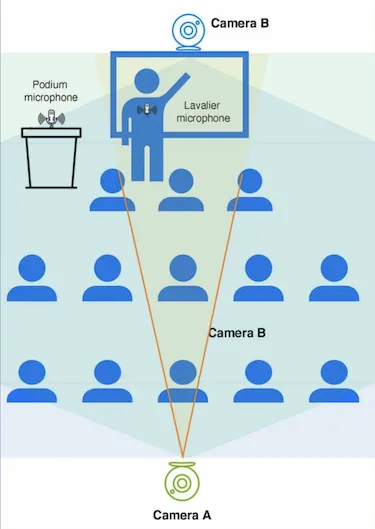
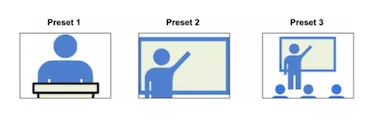
Figure 3 illustrates how a touch panel for the HyFlex setup in Figure 2 allows the instructor to toggle between pre-sets for camera A, the camera trained on the front of the room, and camera B, which provides remote students a view of their in-person peers.
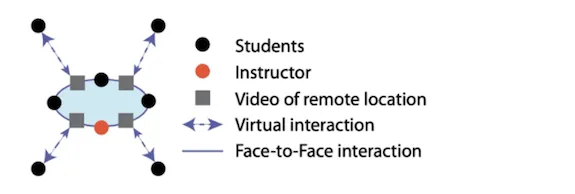
In smaller classes, more distributed arrangements of cameras and microphones have been deployed. Figure 4 (from Bell et al., 2014) illustrates a distributed video model for a smaller seminar, a “personal portal” setup at Michigan State University. In this arrangement, devices with cameras for remote students are distributed to in-person student “buddies.”
Additional Resources
ALL FACULTY WILL BE REQUIRED TO HAVE A NEW SPRING TERM 2021 GATEWAY TEST THROUGH THE UNIVERSITY PROGRAM IN ORDER TO ACCESS CAMPUS FACILITIES BEGINNING JANUARY 4, 2021. Please note that even if you have been tested through Columbia Health in the past, you will be required to get a new test for the Spring semester. Details regarding testing, including locations, are available here. A testing FAQ is available here.
STEP 1: To ensure access to the COVID-19 Online Patient Portal you MUST complete the following survey as soon as possible. The survey should take less than 5 minutes to complete and will be kept strictly confidential.
STEP 2: Get a COVID-19 PCR Gateway test through Columbia Health.
For additional information, please see the COVID-19 Resource Guide for the Columbia Community.
The following self-paced resources provide best practices and tips & tricks for teaching online at SPS:
- Educational Technology Fact Sheets
- Remote Instruction Resources
- Your Course Site: Getting to Know Canvas
- Your Online Meetings: Getting to Know Zoom